App Store optimisation
ASO audit
Paste an App Store or Google Play link for a graded read of the listing: icon, title, subtitle, screenshots, description and whether they tell one story, with the fixes ranked by what each is worth.
Already have credits? Open your workspace — every audit you run is kept there, and reopening one costs nothing.
What a report looks like
A real audit, run by the same code as yours — of our own app, marked down where it deserves it. Audited August 2026.
Needs work
The listing buries its core wallpaper feature behind Siri integration and wastes keyword space on redundant terms.
+3.2 available from 3 fixes below





Clear, high-contrast mark that remains readable at small sizes.
Brand-first structure with strong keyword coverage and near-full character count usage.
Repeats the word wallpaper from the title, wasting metadata space on Apple App Store.
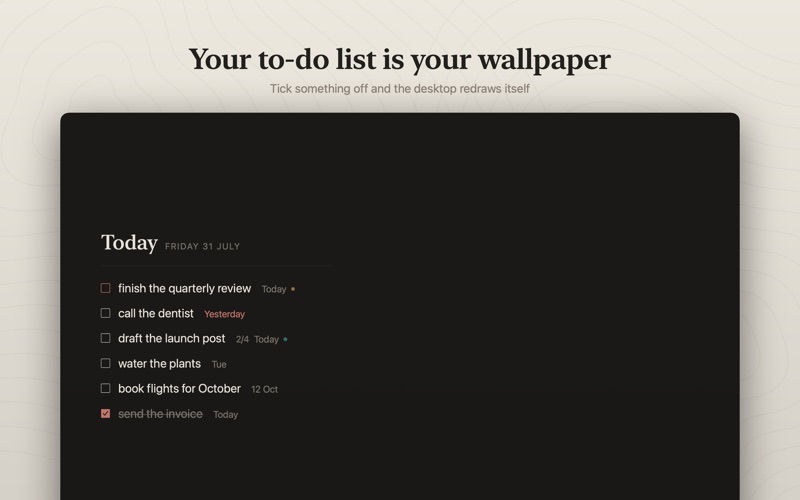
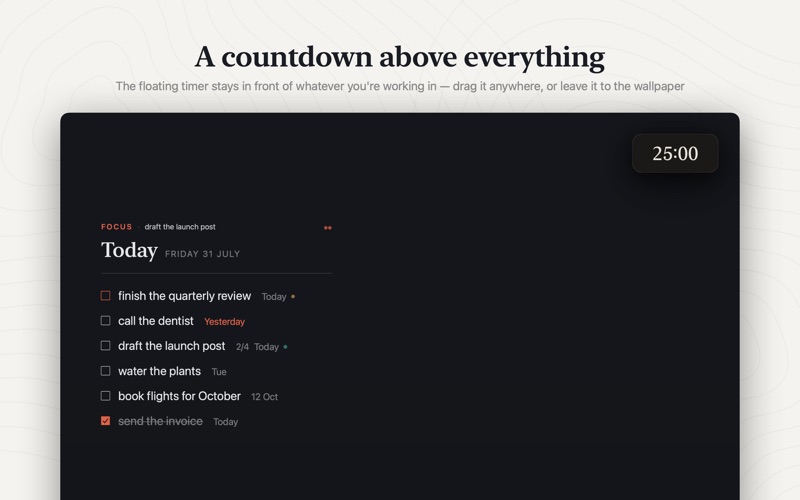
The lead screenshot features Siri voice commands instead of showing the main wallpaper product benefit.
Scannable formatting with clear headers, detailed pricing terms, and a strong three-line opening.
The listing lacks rating volume for social proof and presents feature order inconsistently.
What to fix, biggest win first
- 1Screenshotshigh+1.5
The opening screenshot leads with Siri voice integration, failing to showcase the primary product concept on first impression.
Move screenshot 2 to the first position so shoppers immediately see the desktop wallpaper to-do transformation.
- 2Subtitlemedium+0.9
The subtitle includes the word wallpaper, which is already present in the title and gains no extra search indexing on Apple App Store.
Replace redundant terms with unindexed high-volume keywords like schedule, planner, or daily reminders.
Daily schedule & task planner - 3Overallmedium+0.8
The store listing has zero ratings and reviews, creating social proof friction for potential buyers.
Trigger an in-app rating prompt after users successfully configure their first desktop wallpaper or complete several tasks.
What gets graded
- IconWhether it reads at thumbnail size: contrast, legibility, and whether it looks like a brand or a stock glyph.
- TitleBrand-first ordering, keyword balance, and how much of the 30 characters you actually used. Repeated words are the most common waste.
- SubtitleThe App Store subtitle, or Play's short description, the most-wasted slot in ASO. Checked for a real benefit, keywords the title doesn't already hold, and clean grammar.
- ScreenshotsThe first-screen hook, whether there are benefit-led captions at all, the order they run in, and how dense the text is. Raw screen recordings get called out.
- DescriptionWhether the first three lines earn the tap, how scannable the rest is, and (on Google Play, which indexes it) the keywords you're missing.
- OverallWhether the icon, title and first screenshot tell one story, and whether there's enough rating volume to act as social proof.
How to audit your app store listing
- Copy your listing linkThe App Store or Google Play address of your app, exactly as it appears in the address bar.
- Paste it and run the auditThe icon, screenshots and copy are read in the order a shopper meets them. It takes up to a minute.
- Read the score and the element cardsIcon, title, subtitle, screenshots, description and overall coherence, each graded separately.
- Work the fixes from the topThey are ranked by the points each one wins back, with ready-to-paste copy where the fix is a wording change.
The thinking behind it
We wrote the guides first and built the tool because we kept needing it.
Questions
What does it cost?
One credit an audit, in packs: 5 for $3.99, 20 for $11.99, 60 for $19.99 — 80c an audit at the small end, 33c at the large one. Credits don't expire, and you're never charged for an audit that fails to finish; if it errors the credit goes straight back. The full sample report on this page is free to read, and nothing in it is held back.
What do I paste?
The public link to your listing: an apps.apple.com address containing “/id” and a number, or a play.google.com address containing “?id=” and your package name. The one in your browser's address bar when you look at your own app is exactly right.
How is the score worked out?
Every element is graded against the same rubric (icon, title, subtitle, screenshots, description and overall coherence) and the score is what's left after the problems found. Each fix carries the number of points it would win back, so the list is ordered by what's actually worth doing first.
Does it really look at my screenshots?
Yes. The icon and screenshots are read by a vision model in the order a shopper meets them, which is why it can tell you that screen three has no caption or that the set is an uncaptioned screen-recording dump. That's also why an audit takes up to a minute rather than being instant.
Will it invent things about my app?
It's told to judge only what it can see and to quote your own words when it points at a problem, and every measurable fact (character counts, repeated words, rating volume) is computed rather than guessed. It can still be wrong about taste; treat it as a sharp second opinion, not a verdict.
Can I audit an app that isn't mine?
Yes, any public listing works, which makes it a quick way to see how a competitor's page is put together.
Why is my subtitle shown as empty?
On the App Store the subtitle is a separate field from the title, and plenty of listings never fill it in, that's a finding, not a bug. On Google Play the equivalent is the 80-character short description.
How long does it take?
Up to about a minute. It fetches your live listing, reads the icon and screenshots as images, then grades each element, which is slower than a keyword checker but is what makes the feedback specific to your app rather than generic.
Does it work for Google Play as well as the App Store?
Yes. Paste either kind of link. The two stores are graded against their own rules, because the fields differ: Apple gives you a 30 character subtitle and a hidden keyword field, while Play gives you an 80 character short description and indexes your full description instead.
Do I need an account or an API key?
No API key, ever. An account is needed to hold credits, so you do need one to run an audit — it's Google sign-in, nothing else asked for. Reading the sample report on this page needs nothing at all.
Is my app's data stored?
The listing is public information, fetched and graded for your request. If you're signed in, the report is saved to your account so you can reopen it later without spending another credit, and we delete it on request. Re-auditing the same listing within the hour replays a cached report and costs no credit.
Who handles the payment?
Dodo Payments, as merchant of record. Card details never reach this site, we only see the confirmation that a payment succeeded and how many credits it bought. They issue the invoice. Credits are a final sale — see the refund policy for the exceptions.
Only the public listing is read. We fetch the same store page anyone can see and grade it. Nothing about your app, your account or your traffic is involved.